Let me start by saying this: I’m not a developer. I can barely write a “Hello World” program without Googling the syntax. But last month, during a boring 10-hour train ride, I decided to try something I’d been hearing about everywhere “vibecoding”. And honestly? It blew my mind.
If you haven’t heard of vibecoding yet, it’s basically the idea of building software by describing what you want in plain English, and AI does the heavy lifting. No coding knowledge required. Just vibes. And instructions.
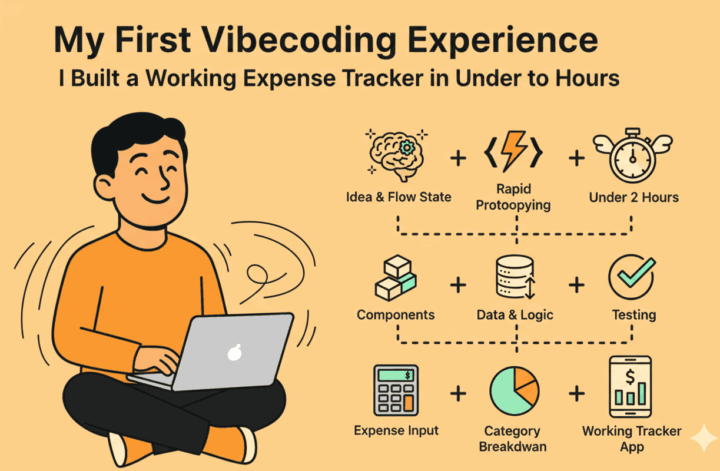
This is the story of how I built a fully functional expense tracker app in less than 2 hours—while sitting on a train, using just my phone.
How It All Started: Boredom Meets Ambition
Picture this: I’m on a train, staring out the window, and I’ve already scrolled through Instagram thrice. I needed something productive to do. So I thought, “Why not build something?”
I’d been wanting to track my expenses better for a while. There are plenty of apps out there, but most of them either have too many features I don’t need, or they’re just not customizable enough. So I decided to build my own.
My first plan? An iOS app. I downloaded Replit (which has an iOS application) and started giving it instructions. Within a couple of hours, I actually had something working. But here’s where things got tricky—turning it into a live iOS app was way more complicated than I expected. The deployment process was a nightmare. I tried again when I got home using my laptop, and it was still too much of a hassle.
That’s when I pivoted. Instead of fighting with app store approvals and complicated setups, I thought: why not just build a web app? I can access it from my phone’s browser, my laptop, anywhere. No app store drama needed.
And that decision changed everything.
Building the Web App: Faster Than I Expected
Once I switched to building a web app, things moved fast. Really fast.
I logged into Replit, opened up the AI agent, and started chatting with it like I was talking to a developer friend. I told it what I wanted: a simple expense tracker where I could log my spending, categorize it, and see some basic stats.
The AI understood immediately. It started building.
Within less than an hour; I’m talking 45 minutes to an hour max, I had a working expense tracker. The app was live and functional before I even finished my coffee.
The final product is called Money Tracker, and you can actually access it here. It’s nothing fancy, but it works perfectly for what I need.
What Does the App Actually Do?
Let me walk you through what I built and remember, all of this was created just by chatting with Replit’s AI agent. I didn’t write a single line of code myself.
The Login Screen: Everything here was written by the AI. I just gave it instructions, and it handled the rest. You can sign in using your Replit account, which makes it super easy.
Dashboard Overview: Once you’re logged in, you see your total spend for the month, number of transactions, top spending category, average daily spend, and average monthly spend. It’s simple but gives me exactly what I need at a glance.
Real Data, Real Use: This isn’t a demo. I’m actually using this app every single day to track my expenses. I started in December 2025, and I’m still logging transactions in January 2026. The data you see on the screen? That’s my actual spending.
Recent Transactions: There’s a quick preview section where I can see my most recent expenses, along with which payment method I’m using the most.
Category and Income Tracking: I can filter expenses by category, add new categories, track income sources, and manage my payment methods—all from the settings.
CSV Import/Export: I added the ability to import and export data as CSV or Excel files. I haven’t used this feature yet, but I know it’ll come in handy later.
The whole thing just works. And it’s exactly what I wanted.
The AI Agent Experience: Bugs, Fixes, and Real-Time Problem Solving
Now, let’s be real, it wasn’t perfect from the start. There were a few bugs along the way, but here’s where things got interesting.
For example, I discovered that when I selected a date—let’s say December 1st—the system would record it as November 30th. Classic timezone bug. So I went back to the AI agent and said, “Hey, there’s a date issue here. Fix it.”
And it did. The AI recognized it was a timezone problem, explained what was happening, and patched it. Just like that.
What amazed me wasn’t just that the AI could build the app, it was that it could debug and fix issues in real time based on my feedback. I didn’t need to understand the code. I just needed to describe the problem, and the AI handled the rest.
Watching the AI agent think through the problem, process my instructions, and then update the code was honestly kind of wild. It felt less like using a tool and more like collaborating with a developer who just happens to work at lightning speed.
Why This Experience Changed My Perspective
Before this, I always thought that if I wanted to build something, I’d need to learn to code first. And while I still think coding is a valuable skill, this experience showed me that the barrier to entry is shrinking fast.
Vibecoding isn’t about replacing developers. It’s about empowering people like me, people with ideas but no technical skills, to bring those ideas to life without needing a computer science degree.
I spent maybe 1.5 to 2 hours total getting everything ready. That includes the initial iOS app attempt, the pivot to the web app, and all the bug fixes. And now I have a tool I use every single day.
The best part? I didn’t have to compromise on what I wanted. The app does exactly what I need it to do, nothing more, nothing less. No bloated features. No subscription fees. Just a simple, functional tool that works for me.
What’s Next?
I’m hooked. I’m already working on my next vibecoding project, a travel bucket list app that I’m calling the “Wander Atlas.” I want a place where I can save travel destinations, track where I’ve been, and plan future trips. And based on how this expense tracker went, I’m pretty confident I can build it.
The way I see it, vibecoding is still in its early days, but it’s already changing what’s possible for non-technical people. If you have an idea and a little bit of time, you can build something real. You don’t need permission, and you don’t need to wait for a developer to help you.
You just need to start.
Final Thoughts
If you’ve been curious about vibecoding but haven’t tried it yet, this is your sign. Pick a tool (I used Replit, but there are others), think of something simple you want to build, and just start chatting with the AI.
You’ll probably make mistakes. You’ll probably run into bugs. But you’ll also build something real and that feeling is unbeatable.